Build noteJan 21, 2025
Configuring Permalinks in WordPress
Permalinks (short for "permanent links") are a fundamental part of WordPress. They determine the structure of your URLs and affect both user-friendliness and search engine optimization (SEO). In this article, we explain how to optimally set the permalinks for your WordPress website.
Why are Permalinks Important?
Permalinks provide permanent, user-friendly URLs that are easy to remember and easy for search engines to analyze. A well-thought-out permalink structure improves:
- SEO Performance:
Descriptive URLs can positively influence your website's ranking. - User Experience:
Clear URLs build trust and make navigation easier.
Example:
- Not optimal:
example.com/?p=123 - Optimal:
example.com/blog/tips-on-seo
Setting Up Permalinks in WordPress
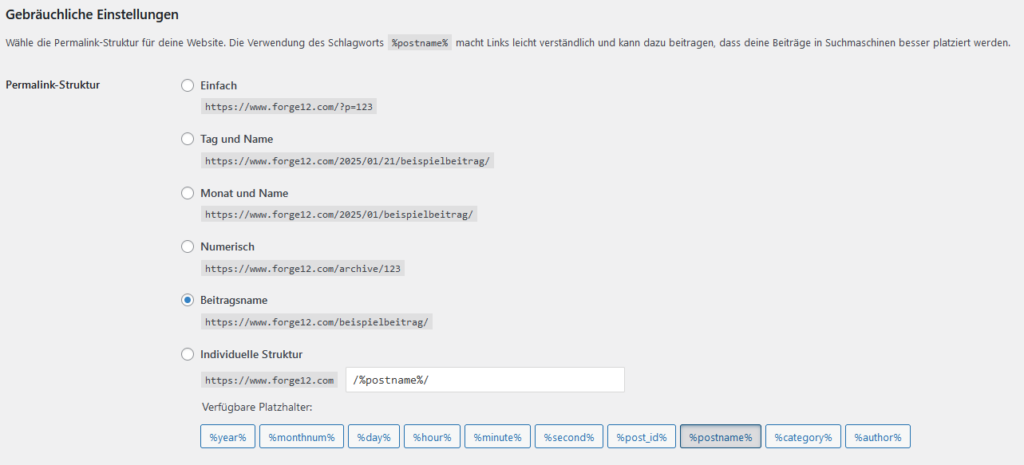
Here’s how to configure the permalinks for your WordPress website:
- Access Settings
- Go to Settings > Permalinks in the WordPress dashboard.
- Choose the Right Structure
WordPress offers several default options:
- Simple:
example.com/?p=123 - Post Name:
example.com/post-title(recommended for SEO). - Tag and Name Based:
example.com/2025/01/21/post-title
- Simple:
- Custom Structure
If you prefer a custom URL structure, you can use placeholders like:%postname%: The title of the post.%category%: The category of the post.
/blog/%postname%/
- Don’t Forget to Save
After selecting your structure, click Save Changes.
Tips and Best Practices
- Set Up 301 Redirects:
When you change your permalinks, ensure that old URLs redirect to the new ones to avoid 404 errors. - Use SEO Tools:
Utilize tools like Yoast SEO or Rank Math to optimize your URL structure. - Avoid Duplicate Content:
Ensure that each product or page is accessible under only one URL.
Conclusion
Properly configuring permalinks in WordPress is essential for creating a user-friendly and SEO-optimized website. Use clear, descriptive URLs, tailor the structure to your website's needs, and set up redirects if necessary. This will create a solid foundation for your success online.