Build noteJan 21, 2025
Configuring WooCommerce Permalinks Correctly
The permalink settings in WooCommerce are a crucial factor for the usability and search engine optimization (SEO) of your online store. A well-thought-out URL structure can not only improve your rankings but also make navigation easier for your customers. In this article, we will show you how to optimally set up permalinks in WooCommerce while avoiding common mistakes.
Configuring WooCommerce Permalinks
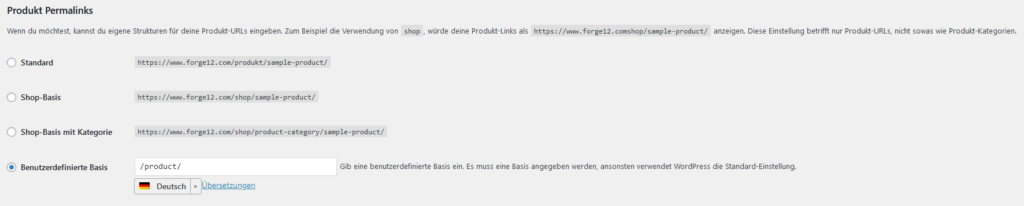
Here’s how to set up the permalink structure of your WooCommerce store:
1. Access the Permalink Settings
- Log in to the WordPress dashboard.
- Navigate to Settings > Permalinks.
- Scroll down to the WooCommerce section.
2. Optimize Product URLs
The product URL is crucial as it represents the main pages of your store. You have the following options:
- Standard:
example.com/product/productname - Custom:
/products/%product_cat%/%product%/
Tip: Using %product_cat% integrates the category into the URL and provides better SEO and navigation.
3. Customize Shop Base
To give your shop a consistent structure, you can define a shop base:
- Example:
/shop/%product_cat%/
This creates a hierarchy that is clearer for both customers and search engines.
4. Structure Categories and Tags
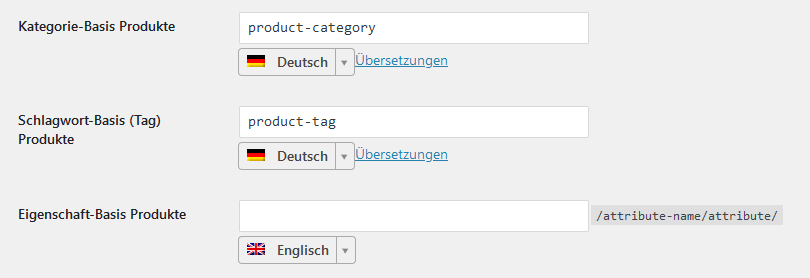
- Product Categories:
/product-category/%product_cat%/ - Product Tags:
/product-tag/%product_tag%/
These structures make it easier to find related products and improve the filtering options of your store.
5. Save and Verify
Don't forget to click Save Changes after your adjustments. Then check if your URLs are functioning correctly and not generating error pages.
Common Mistakes and How to Avoid Them
Despite careful configuration, mistakes can occur when setting up permalinks that negatively impact user experience and SEO ranking. Here are some of the most common issues and how to effectively resolve them:
- Forgotten Redirects
- When changing the permalink structure, set up 301 redirects from the old to the new URLs to avoid ranking losses and 404 errors.
- Duplicate Content
- Ensure that products are only accessible under a single URL. Use canonical URLs or redirects to prevent duplicates.
- Unnecessary URL Parameters
- Remove parameters that do not provide additional information, as they complicate the URL unnecessarily.
- Lack of Consistency
- Maintain a consistent structure across all product pages to avoid confusion for customers and search engines.
Tips for a Perfect URL Structure in WooCommerce
An optimal URL structure is essential for improving the usability of your WooCommerce store while strengthening your SEO strategy. By using clear, concise, and descriptive URLs, you can effectively target both search engines and customers.
- Use short and descriptive URLs.
- Incorporate relevant keywords into the URLs without overloading them.
- Utilize tools like Yoast SEO or Rank Math to check and optimize the URL structure.
Conclusion
A well-thought-out permalink structure is a key factor for the success of your WooCommerce store. It enhances user experience, supports your SEO efforts, and creates a professional impression. By following the steps and tips mentioned above, you lay the foundation for a successful online store with clear and effective URLs.