Build noteDec 03, 2024
Opt-In Templates
Email / Opt-in Template Parameters and Configuration
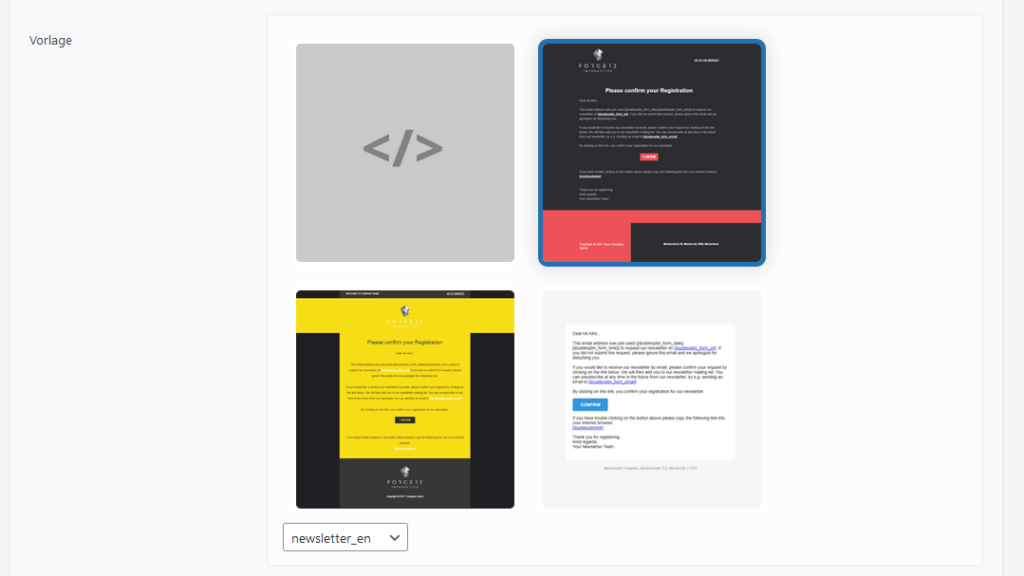
The Double Opt-in Plugin offers various templates that can be used for the opt-in email. You can customize these templates to your liking.
The templates can be individually customized for each form. The settings are available in the respective configuration settings.
Attention
For the opt-in to work properly, it is necessary to include the parameter [doubleoptinlink]. This placeholder will be automatically replaced by the opt-in link when generating the email.
Placeholders
Use this placeholder to include the generic link for the opt-in:
<a href="[doubleoptinlink]">Confirm Opt-In</a>
There are additional parameters available that can be included in the opt-in email:
| WordPress Shortcode | Required Field | Description |
| [doubleoptinlink] | X | Creates the link responsible for executing the opt-in. |
| [doubleoptin_form_url] | - | Contains the path to the form filled out by the visitor to start the opt-in process. |
| [doubleoptin_form_subject] | - | The subject of the double opt-in form. |
| [doubleoptin_form_date] | - | The date when the opt-in was performed. |
| [doubleoptin_form_time] | - | The time when the opt-in was performed. |
| [__site_admin_email] | - | The WordPress email address |
| Contact Form 7 Tags | - | All Contact Form 7 fields are also available for the opt-in email. (only for Contact Form 7 forms) |
| Avada Tags | - | All Avada fields are also available for the opt-in email. (only for Avada forms) |
| Elementor Tags | - | All Elementor fields are also available for the opt-in email. (only for Elementor forms) |