GDPR & ComplianceNov 02, 2023
How to Prevent WooCommerce from Loading pixel.wp.com and stats.wp.com (GDPR)?
The GDPR requires websites not to load external resources when users only consent to the necessary cookies. Those using WooCommerce from the developer Automattic may overlook that, despite correct cookie settings, resources from the servers pixel.wp.com and stats.wp.com are loaded without explicit user consent. This transmits the user's IP address to a server in the USA, which is not compliant with data protection regulations. Here you will learn where this comes from and how to prevent it.
Where Does the Connection Come From?
To further develop and optimize their software, WooCommerce collects usage data. This data is then used to develop new features for WooCommerce, maintain statistics, or personalize marketing communication. The reasons are understandable; however, WooCommerce customers in Europe must regulate this due to the GDPR.
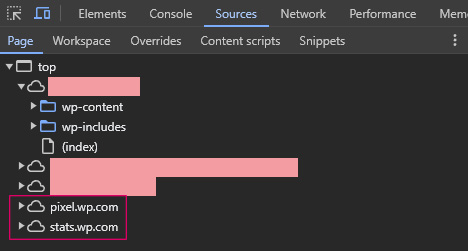
How Do I Disable the Connection to pixel.wp.com and stats.wp.com?
Fortunately, the solution to this problem is not complicated. In the WordPress dashboard under WooCommerce – Settings – Advanced – WooCommerce.com, you will find the setting for usage tracking. The checkbox for "Enable Tracking" should not be checked!
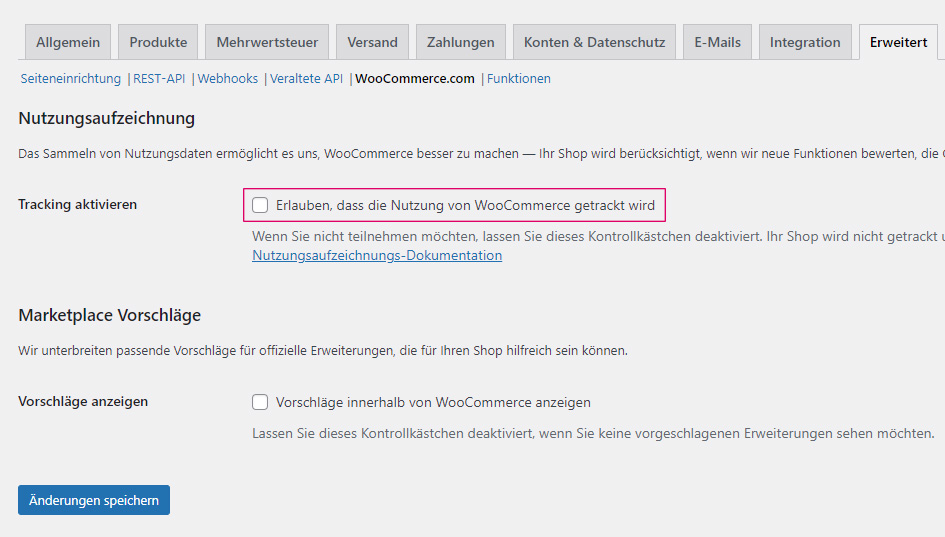
If you have disabled this option and the connection to pixel.wp.com or stats.wp.com is still established, it may be related to third-party services. For example, the "JetPack" plugin from the same developer has a statistics feature that logically accesses the same servers. This feature should then be disabled.