WooCommerce & Shop OperationsJun 30, 2021
One Stop Shop (OSS) with WooCommerce
On July 1, 2021, the One Stop Shop procedure (OSS) will be rolled out across Europe. This procedure helps simplify the collection of value-added tax (VAT). Until now, different threshold values have applied across Europe, depending on the member state. If this threshold was exceeded, one had to register in the respective country to remit VAT there.
What changes?
With the implementation of the One Stop Shop (OSS) procedure, the threshold will be uniformly lowered to 10,000 EUR for the calendar year. As long as you do not exceed this value, you can conveniently remit VAT in the country where your business is located.
Once you exceed the threshold, you will need to register with the single point of contact (OSS) in the future. There, you can easily declare and remit the VAT due for member states.
How can I adapt my WooCommerce shop for OSS?
There is already a suitable solution for this. Vendidero, the developers of Germanized, offer the WooCommerce plugin One Stop Shop Plugin for WooCommerce for free.
If you are already using Germanized, you can even avoid installing a new plugin. Since June 29, Vendidero has integrated the OSS adaptation into the Germanized plugin.
How can I check if I am affected by the OSS procedure?
First, you should check whether you exceed the threshold. You can simply go to WooCommerce > One Stop Shop.
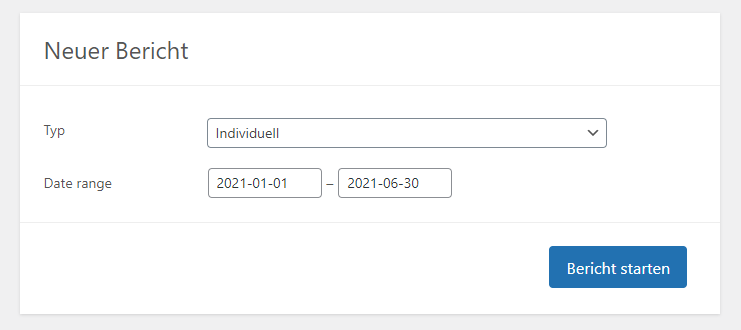
Now create a new report starting from January 1, 2021, to the current date. The report will show you whether you have already exceeded the threshold or how close you are to it.
If you exceed the threshold, an additional registration for the OSS procedure is required. You should do this in a timely manner. Additionally, you need to adjust your WooCommerce shop. This mainly affects tax calculation but also price display.
How to adjust tax calculation in WooCommerce
In the settings of WooCommerce > Settings > OSS, you can automate the automatic adjustment of EU tax rates by activating the OSS participation button. Alternatively, you can also adjust this manually via WooCommerce > Settings > Tax > Standard Rates.
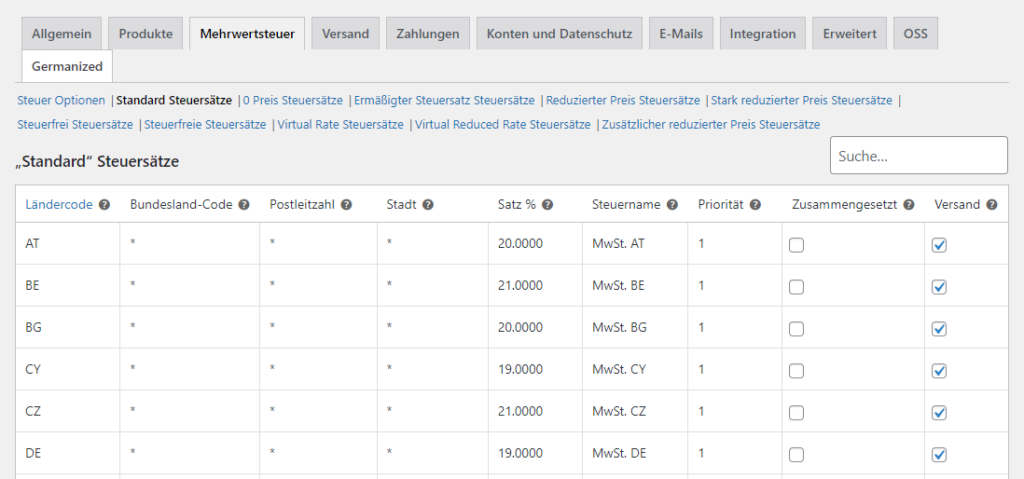
In addition to the standard tax rates, there are also the reduced, higher, and significantly reduced tax rates. In Germany, there is only one reduced tax rate. Other EU countries have up to two additional reduced tax rates.
After importing and participating in the OSS, the amounts at the checkout will be calculated based on the standard tax rate. However, conflicts may arise due to the reduced tax rates.
For example, pet food is taxed at 7% (reduced tax rate) in Germany. However, this can be quite different in other countries.
But the Vendidero plugin also helps here. In the edit view of your products, you will now find a new option that allows you to set different tax classes for different countries.
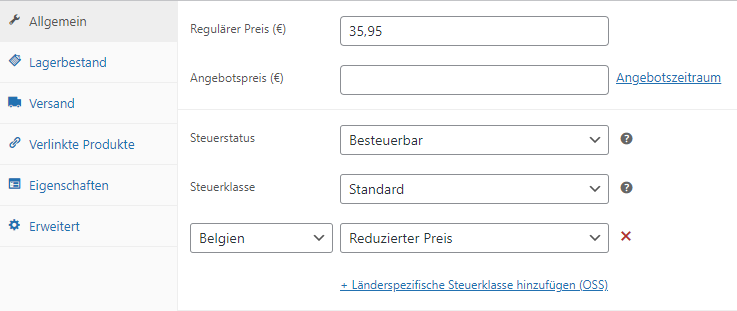
This also means that you now need to define the correct tax classes for each product and for each country you sell to (if they are taxed differently).
Regularly create and export reports
The Federal Central Tax Office requires regular reports for the OSS procedure. These must be submitted quarterly and no later than one month after the end of the quarter. The One Stop Shop plugin offers you an easy export to CSV for this purpose. It automatically calculates the net and tax amounts for the respective country. You can then conveniently hand over the report to your tax advisor.
Step-By-Step Instructions
- Download the One Stop Shop Plugin for WooCommerce
- Generate a report to check if you are affected by the OSS procedure (>10,000 EUR, WooCommerce > OSS)
- Register for OSS
- Import tax rates by confirming the OSS participation button (WooCommerce > Settings > OSS)
- Enter reduced tax rates at the product level according to tax class and country (Products > Edit > General > Add country-specific tax class (OSS))
- Create quarterly reports and hand them over to your tax advisor. (WooCommerce > OSS)